Arduino Humidity sensor
The DHT22 is a basic, low-cost digital temperature and humidity sensor. It uses a capacitive humidity sensor and a thermistor to measure the surrounding air, and spits out a digital signal on the data pin (no analog input pins needed). It's fairly simple to use, but requires careful timing to grab data. The only real downside of this sensor is you can only get new data from it once every 2 seconds, so when using our library, sensor readings can be up to 2 seconds old.
Simply connect the first pin on the left to 3-5V power, the second pin to your data input pin and the rightmost pin to ground. Although it uses a single-wire to send data it is not Dallas One Wire compatible! If you want multiple sensors, each one must have its own data pin.
TECHNICAL DETAILS
Low cost
3 to 5V power and I/O
2.5mA max current use during conversion (while requesting data)
Good for 0-100% humidity readings with 2-5% accuracy
Good for -40 to 80°C temperature readings ±0.5°C accuracy
No more than 0.5 Hz sampling rate (once every 2 seconds)
Body size 27mm x 59mm x 13.5mm (1.05" x 2.32" x 0.53")
4 pins, 0.1" spacing
Weight (just the DHT22): 2.4g
Hardware needed for Arduino Humidity tester:
1. Arduino Pro Mini
2. Sensor DHT22
3. Some jumper cables
The circuit is simple, when power source can take from Arduino Pro Mini, data cable can connect to any pin (let's say pin no. 7)
In order to use DHT22 sensor, adafruit library for it needs to be installed and the file Adafruit_sensor.h has to be copied into the Library directory.
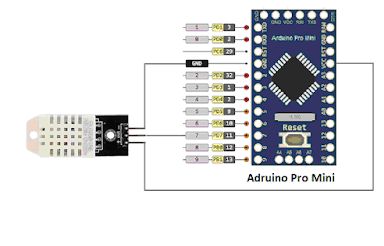
Sample code –
#include <DHT.h>;
//Constants
#define DHT_PIN 7 // Output of DHT22 to pin 7 Arduino
#define DHT_TYPE DHT22 // DHT22 (AM2302)
DHT dht(DHT_PIN, DHT_TYPE); // Initialize DHT sensor for Arduino 16MHz
//Variables
int chk;
float hum; //Stores humidity value
float temp; //Stores temperature value
void setup() {
Serial.begin(9600);
dht.begin();
}
void loop() {
//Read value of Humidity and Temperature
hum = dht.readHumidity();
temp= dht.readTemperature();
//Print out value of Humidity and Temperature
Serial.print("Humidity is: ");
Serial.print(hum);
Serial.print("% --- Temp is: ");
Serial.print(temp);
Serial.println("dgC");
delay(2000); //Delay 2 sec.
}