Using the Ultrasonic sensor HC-SR04 with Arduino
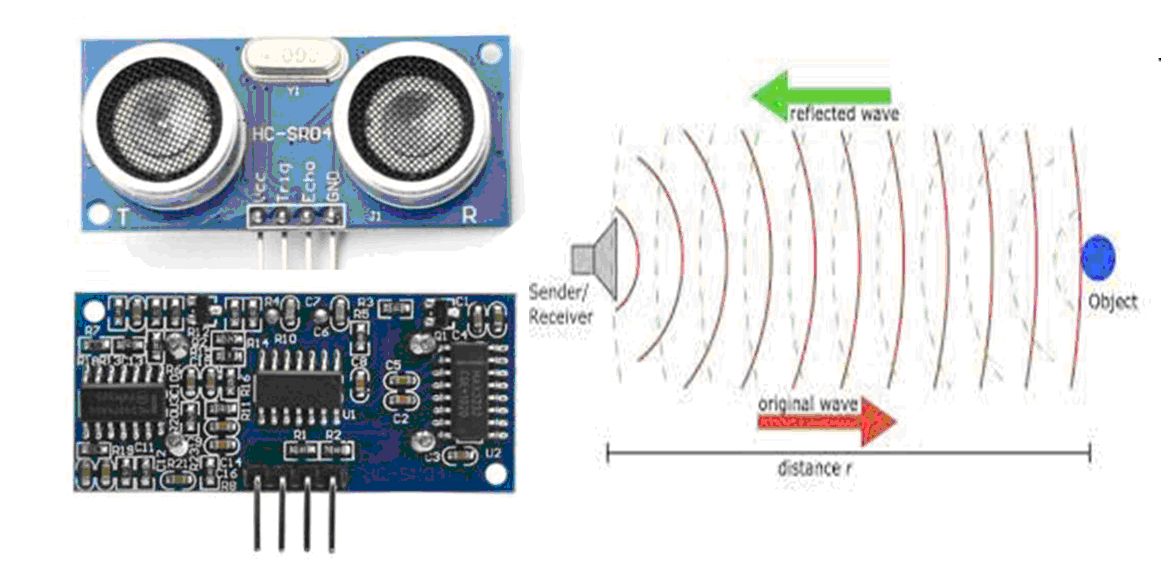
The HC-SR04 ultrasonic sensor works like Sonar to determine the distance of an object just like the bats do. It offers excellent non-contact range detection from 2 cm to 400 cm (or 1” to 13 feet) with high accuracy and stable readings in an easy-to-use package.
The operation is not affected by sunlight or black material, although acoustically, soft materials like cloth can be difficult to detect. It comes complete with ultrasonic transmitter and receiver module.
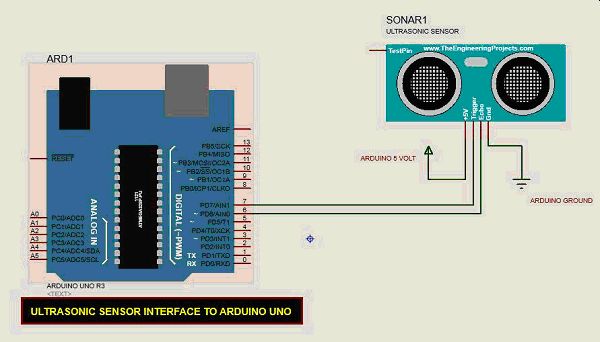
The HC-SR04 Ultrasonic Module has 4 pins, Ground, VCC, Trig and Echo. The Ground and the VCC pins of the module needs to be connected to the Ground and the 5 volts pins on the Arduino Board respectively and the trig and echo pins to any Digital I/O pin on the Arduino Board.
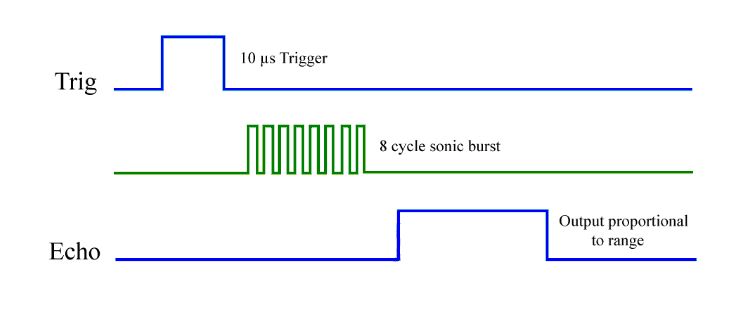
In order to generate the ultrasound you need to set the Trig on a High State for 10 µs. That will send out an 8 cycle sonic burst which will travel at the speed of sound and Echo from any Object will be detected by the sensor. The Echo pin will output the time in microseconds the sound wave traveled.
For example, if the object is 10 cm away from the sensor, and the speed of the sound is 340 m/s or 0.034 cm/µs the sound wave will need to travel about 294 u seconds. But what you will get from the Echo pin will be double that number because the sound wave needs to travel forward and bounce backward. So in order to get the distance in cm we need to multiply the received travel time value from the echo pin by 0.034 and divide it by 2.
Technical Specifications
• Power Supply − +5V DC
• Quiescent Current − <2mA
• Working Current − 15mA
• Effectual Angle − <15°
• Ranging Distance − 2cm – 400 cm/1″ – 13ft
• Resolution − 0.3 cm
• Measuring Angle − 30 degree
• Trigger Input Pulse width: 10uS
• Dimension: 45mm x 20mm x 15mm
Components Required
You will need the following components −
• 1 × Breadboard
• 1 × Arduino Uno R3
• 1 × ULTRASONIC Sensor (HC-SR04)
Procedure
Follow the circuit diagram and make the connections as shown in the image given below.